macOS · Native · Lifetime license

I just wanted to
rename the tabs.

A real terminal where you can name your tabs,
keep notes right beside them, and reopen your workspace exactly where you left it.

  • // A terminal with memory for AI developers
  • // Built because Terminal wouldn't let me rename the tabs
  • // Your notes live where your work lives
~ — -zsh
~ — -zsh
~ — -zsh
~ — -zsh
← sound familiar?
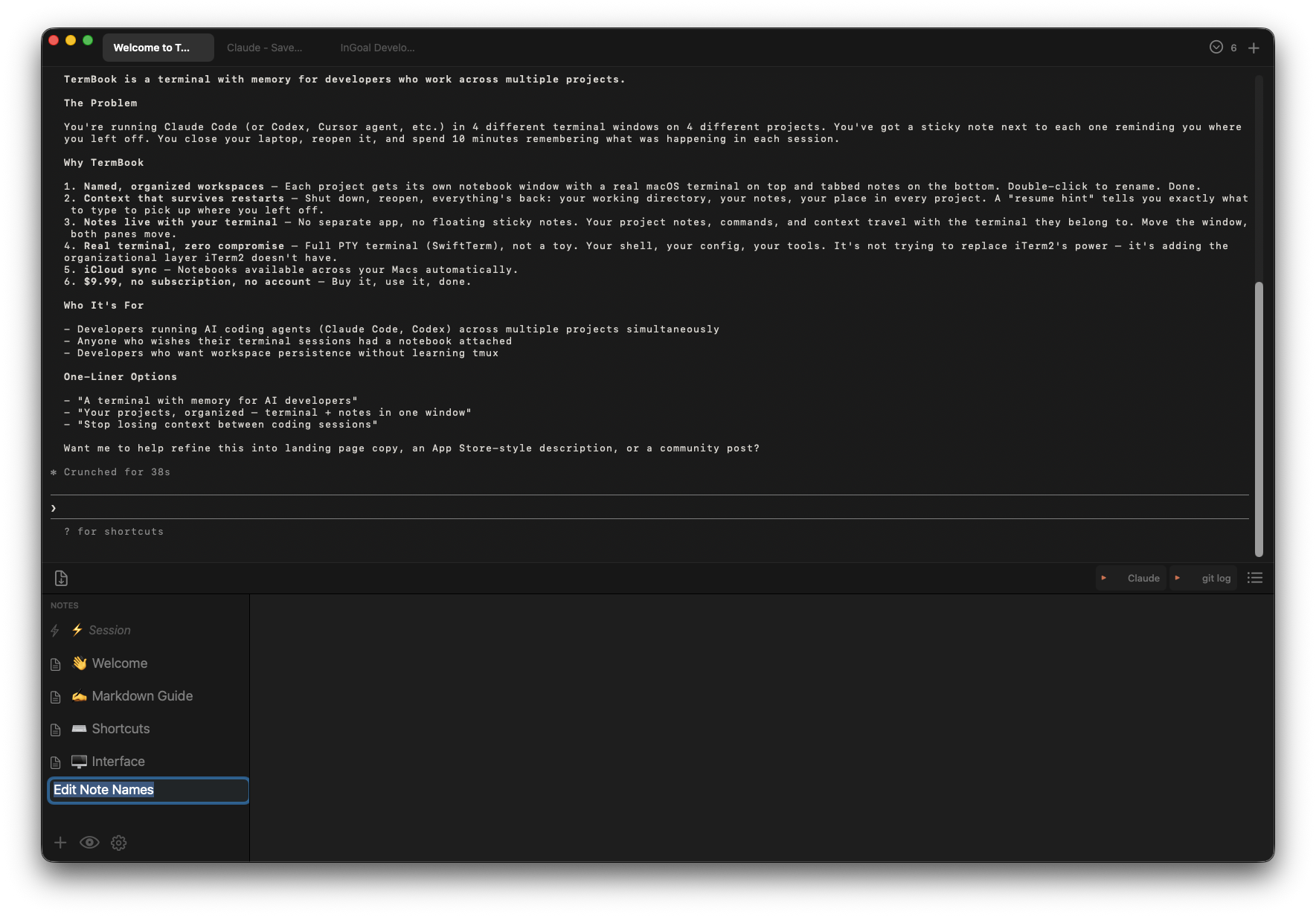
TermBook — terminal on top, named tabs, notes below

I had too many Claude Code sessions open and couldn't tell them apart. So I built this — a real terminal where you can name the tabs and keep your notes right there beside them.

Now → Free first 50 downloads
30 days → $9.99 early adopter · lifetime
After → $19.99 full price · lifetime
✏️Rename any terminal tab — double-click, type a name, done
📓Notes live beside your terminal — not somewhere else. Right there.
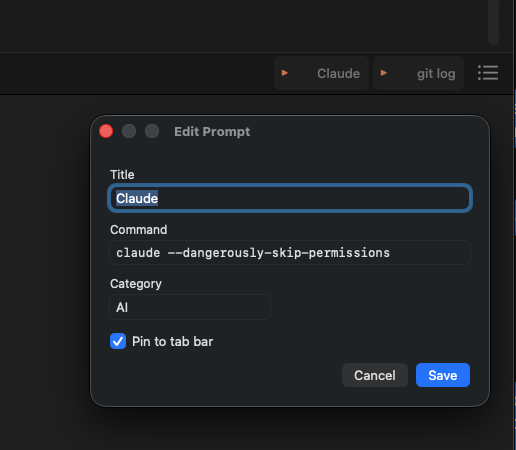
QuickPrompt — save your commands, fire them into the terminal in one click
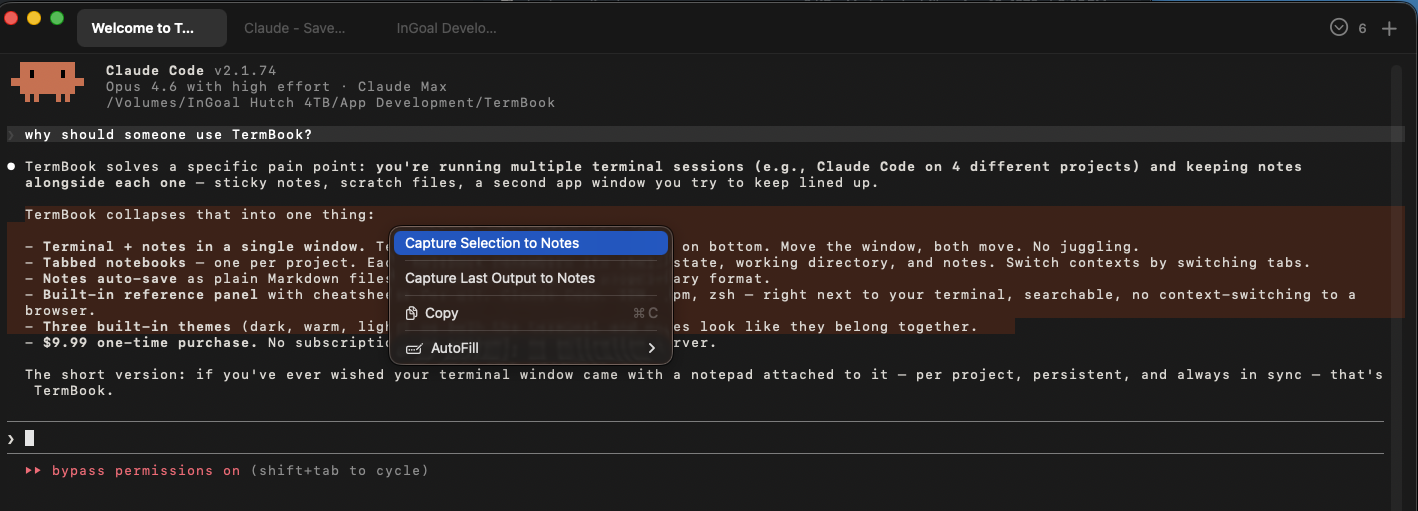
📋QuickCopy — Cmd+Shift+D sends terminal output to notes. Grabs last response if nothing selected.
🔄Reopens where you left off — notebooks, directory, and context all restored
// How this happened

Six sessions open. All called "zsh". I finally got annoyed enough to fix it.

I run Claude Code across multiple projects at once — four or five terminal sessions all running in parallel, all named ~ — -zsh. ~ — -zsh. ~ — -zsh. Which one is which? You click around until you find it.

All I wanted was to rename the tab. Terminal wouldn't do it. So I had actual sticky notes on my screen just to keep track. Eventually I got annoyed enough to build something.

While I was at it, I added notes — a tabbed notebook that lives below the terminal, always right there. Then I kept forgetting my Claude Code commands, so I'd switch to the Claude app, ask, copy the answer, paste it back. Every time. So I added QuickPrompt — one-click buttons that fire saved commands straight into the terminal.

Then I'd get useful feedback from Claude and need to save it somewhere. I was copying it into text files, which felt ridiculous. So I added QuickCopy: hit Cmd+Shift+D and terminal output lands in your notes instantly. Nothing selected? It grabs the last response automatically.

I just kept solving the next small annoyance. Maybe you have the same ones.
What you get.

✏️
Rename your terminals
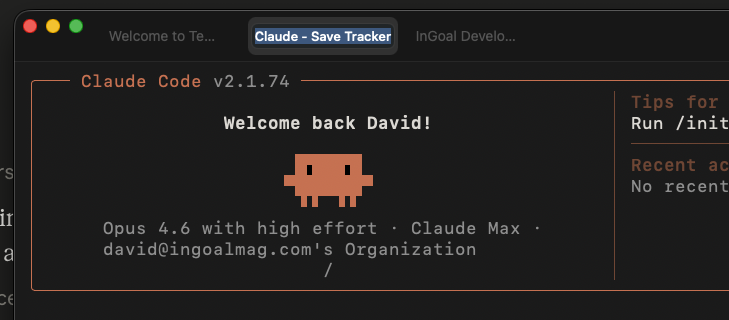
Double-click any tab and give it a real name. "InGoal Dev", "Claude Code", "Git". The whole reason this app exists.
[ GIF: double-click ~ — -zsh → type "InGoal Dev" → enter ]
replace feat-snippet div with: <img src="assets/rename-demo.gif" style="width:100%;border-radius:4px;margin-top:10px">
📓
Notes pane — always there
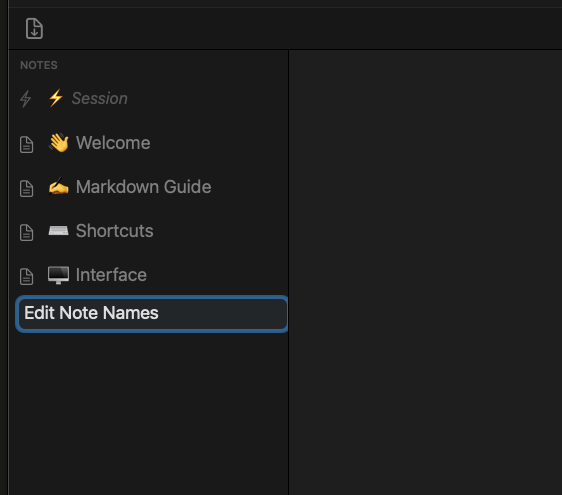
A tabbed notebook sits below every terminal. Multiple tabs per notebook. Markdown. Auto-saves as you type. Drag the divider to give either side more room.
📋
QuickCopy
Highlight terminal output and hit Cmd+Shift+D — it lands straight in your notes. Nothing highlighted? It grabs the last response automatically. No copy-paste, no switching apps.
## Claude's suggestion — saved automatically
Use --dangerously-skip-permissions
to bypass approval prompts in Claude Code
QuickPrompt
Save the commands you reach for constantly. Pin them to the tab bar and fire them into the terminal in one click — no switching apps, no copy-pasting from somewhere else.
claude --dangerously-skip-permissions
git push origin main
npm run dev
🔄
Session restore
Close TermBook, reopen it — your notebooks are back, your last directory is back, and your notes have what you need to pick up where you left off.
🔒
100% Local-First
Your terminal history, notes, and prompts live on your machine. Nothing goes anywhere you didn't ask for. iCloud sync is opt-in, notes only — scrollback never leaves your Mac.
⬡ No account · No server · No tracking
🗄️
Archive notebooks
Done with a project? Archive the notebook. Tidy without deleting. Reopen anytime.
🎨
Three themes
Obsidian Dark, Claude Warm, Editorial Light. Each is a complete visual system, not just a colour swap. Change in Settings.
// See it

What it actually looks like.

TermBook full window
The full picture — terminal on top, tabbed notes below. One window, everything in one place.
Named terminal tabs
Named tabs — finally know what's running in each session without clicking around.
Prompt library
Prompt library — save, name, and pin your most-used commands to the tab bar.
Capture to notes
Capture to notes (Cmd+Shift+D) — terminal output lands straight in your notebook.
Session context in notes
Session context stays with the terminal — not buried somewhere you have to go find it.
// Three themes

Find your light.

$ claude
Obsidian Dark
near-black · indigo accent
$ git push
Claude Warm
warm dark · amber accent
$ vim notes.md
Editorial Light
warm cream · dark terminal
// Pricing

Simple. Honest. Yours forever.

Happening Now
Free
no cost · no catch
First 50 downloads. Full app, all features, no expiry.
30 Days After Launch
$9.99
one-time · lifetime
Early adopter price once the free slots fill. Real money, but not a lot of it.
Full Price
$19.99
one-time · lifetime
After the launch window. Still one-time. No subscription. No account. Ever.
Why the first 50 are free — honestly.

I'm giving the first 50 copies away because I'd genuinely love for you to try TermBook and tell me what you think. Not a review — just an honest "this worked" or "this didn't." That feedback is worth more to me right now than the $9.99.

After that, it's $9.99 for the first 30 days, then $19.99. Both are lifetime purchases — no subscription.

I'm not trying to build a big company here. I built TermBook to solve a problem I had. But if it becomes something you reach for every day, I'd appreciate it helping cover a few hours of the time that went into building it. I'll keep improving it as long as people find it useful.

That's the whole ask.

Download free — first 50
// Under the hood

Built the right way.

SpecDetail
ArchitectureUniversal Binary Native Apple Silicon + Intel
Terminal engineFull PTY — real shell, not a wrapper or emulator
Notes storagePlaintext Markdown · local SQLite index · your files, your format
SynciCloud (opt-in, notes only) — scrollback is always local
PrivacyNo account. No analytics. No network calls you didn't initiate.
macOSMonterey 12.0+ required · Ventura, Sonoma, Sequoia fully supported
LicenseLifetime purchase — all v1.x updates included, no subscription